Seeking purple team internship · 2027

> hello, world. I'm

codenameruxchipher// Sydney, AU

Cyber security student, purple team learner, Active Directory lab builder, aspiring threat hunter.

I break things in my own Active Directory lab, then learn how to catch them. Every attack I run ends with a detection I can show, and that's why I'm working toward purple teaming.

detections.log 3 alerts
09:41:07 [!] EID 4769 TGS-REQ · RC4 (0x17) → DC01 09:41:12 [!] EID 4625 failed logon ×5 → DC01 09:41:20 [!] EID 4688 suspicious process → WIN11
simulated from the network behind this page
SCROLL

01 · home lab

Harbourline Freight.
A fake company I attack and defend.

A full Active Directory environment virtualised on my own machine, built to practise real attacks and the detections that catch them.

Network topology ● online

Every VM runs under KVM on an Arch Linux host. The attacker box sits on its own NAT network: it reaches the internet, but nothing outside can reach in.

HOST · Arch Linux + KVM/QEMU LAB NETWORK · NAT, no inbound virtual switch Domain ControllerWindows Server 2025 WorkstationWindows 11 · domain-joined AttackerKali Linux TGS-REQ auth / GPO HOST · Arch Linux + KVM/QEMU LAB NETWORK · NAT, no inbound Domain ControllerWindows Server 2025 virtual switch WorkstationWindows 11domain-joined AttackerKali Linuxattack box auth / GPO TGS-REQ
host
Arch Linux · KVM / QEMU
dc
Windows Server 2025 (AD DS)
client
Windows 11, domain-joined
attacker
Kali Linux on the lab network
org
Harbourline Freight · 12 users · OUs · GPOs
logging
Audit policy GPO · Sysmon on client

Build roadmap

  • doneKVM host on Arch Linux, NAT lab network
  • doneWindows Server 2025 DC + Windows 11 client
  • doneHarbourline Freight: 12 users, OUs, GPOs
  • doneAudit policy GPO: 4688 command lines, logons, group changes
  • doneSysmon on Windows 11 for endpoint telemetry
  • doneKerberoasted svc_sql, caught it as 4769 (AES, not RC4)
  • doneLLMNR/NBT-NS poisoning: captured a hash, detected and hardened
  • doneWazuh SIEM: central alerting with custom detection rules
  • nextTune detections, then Atomic Red Team simulations
ruxchipher / purple-team-journey Lab notes, build steps and detections

02 · detections

Attack. Detect. Document.

Each technique I run in the lab becomes a write-up with the detection that catches it.

Kerberoasting: attack & detect

  • MITRE T1558.003
  • Event ID 4769
  • documented

A service account with an SPN is set up on purpose. I request its ticket from Kali, then hunt for that request in the domain controller's Security log. On Server 2025 the DC only issues AES tickets, which changes how the detection has to work.

  1. Red

    Register an SPN on a service account, then request its TGS from Kali.

  2. Blue

    Catch the request as Event 4769 on the DC. On this AES-only domain the ticket is 0x12, not the classic RC4 0x17.

  3. Purple

    Tune out machine accounts and krbtgt, then harden the account: long random password or gMSA, AES only.

# Hunt: RC4 service tickets requested for user accounts
$xpath = "*[System[EventID=4769] and EventData[Data[@Name='TicketEncryptionType']='0x17']]"

Get-WinEvent -LogName Security -FilterXPath $xpath |
  Where-Object { $_.Properties[2].Value -notmatch '\$$|^krbtgt$' } |
  Select-Object TimeCreated,
    @{n='Account'; e={$_.Properties[0].Value}},
    @{n='Service'; e={$_.Properties[2].Value}},
    @{n='Client';  e={$_.Properties[6].Value}}

# 0x17 = RC4-HMAC, the classic Kerberoasting tell
title: Kerberoasting - RC4 service ticket requested
status: experimental
description: TGS requested with RC4-HMAC for a user (non-machine) service account
tags:
  - attack.credential-access
  - attack.t1558.003
logsource:
  product: windows
  service: security
detection:
  selection:
    EventID: 4769
    TicketEncryptionType: '0x17'
    Status: '0x0'
  filter_machine:
    ServiceName|endswith: '$'
  filter_krbtgt:
    ServiceName: 'krbtgt'
  condition: selection and not 1 of filter_*
falsepositives:
  - Legacy apps that still require RC4
level: medium

The catch: the rule below hunts RC4 (0x17), the classic tell. But my Server 2025 DC refuses RC4, so my attack came back as AES (0x12) and this rule never fires. The real detection here is behavioural: baseline which accounts normally request service tickets and alert on the unusual ones.

read the lab notes on GitHub ↗
LLMNR / NBT-NS poisoning: attack & detect

  • MITRE T1557.001
  • Sysmon Event 3 & 22
  • documented

When DNS fails, Windows falls back to LLMNR, NBT-NS and mDNS and trusts whoever answers. I poison those answers from Kali with Responder, the client authenticates to me, and I capture its Net-NTLMv2 hash. Then I catch it in the logs and shut the attack down.

  1. Red

    Poison name resolution from Kali with Responder, then capture a Net-NTLMv2 hash when the client touches a fake share.

  2. Blue

    Catch the rogue SMB connection to the attacker (Event 3) and the bogus name resolving to an endpoint (Event 22). The broadcast rule needed the Sysmon config fixed to log UDP first.

  3. Purple

    Disable LLMNR, NBT-NS and mDNS. mDNS is the third vector most hardening guides forget.

# Hunt: LLMNR / NBT-NS broadcasts from a host (Sysmon Event 3)
Get-WinEvent -FilterHashtable @{ LogName='Microsoft-Windows-Sysmon/Operational'; Id=3 } |
  Where-Object { $_.Message -match 'DestinationPort: (5355|137)' -and
                 $_.Message -match 'Initiated: true' } |
  Select-Object TimeCreated

# SwiftOnSecurity's config drops UDP, so this is blind until you add
# 5355 / 137 / 5353 to the NetworkConnect include block.
title: LLMNR and NBT-NS Responder traffic
status: experimental
tags:
  - attack.credential-access
  - attack.t1557.001
logsource:
  product: windows
  category: network_connection
detection:
  selection_llmnr:
    Initiated: 'true'
    Protocol: 'udp'
    DestinationPort: 5355
  selection_nbtns:
    Initiated: 'true'
    Protocol: 'udp'
    DestinationPort: 137
  condition: selection_llmnr or selection_nbtns
level: medium

The catch: the rule keys on Sysmon network-connection events for UDP 5355/137, but SwiftOnSecurity's config logs no UDP, so it was blind until I added those ports to the sensor. The signals that caught the attack anyway: the rogue SMB connection (Event 3) and the poisoned name resolving to the attacker (Event 22).

read the full write-up on GitHub ↗
live

Wazuh SIEM

A Wazuh SIEM now collects Security and Sysmon from both Windows hosts, with my custom rules firing on the live attacks, including a Kerberoast that a built-in rule was silently dropping.

next up

Atomic Red Team

Run scripted ATT&CK techniques against the lab to test my detections at volume, not one attack at a time.

03 · toolkit

Tools I've built.

Small, focused projects from the detection and blue-team work around my lab. Each one is its own repo with a README, tests and CI.

// security tooling

// browser demos · live, nothing sent anywhere

live

ATT&CK coverage heatmap

Every detection I have written, mapped onto MITRE ATT&CK. Shaded by how many independent detections back each technique, with the gaps marked in red.

live

Password strength visualizer

Type a password and watch a live meter, entropy estimate and crack time. All in the browser.

live

Network attack map

An animated world map of simulated cyber attacks, drawn on canvas. Random data, clearly labelled.

live

Typing speed test

A clean typing game with live WPM, accuracy and a best score. Something to share and play.

04 · workstation

A desktop that
watches its own back.

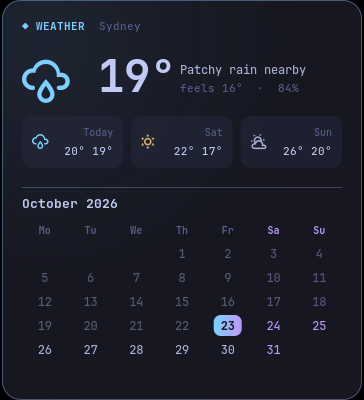
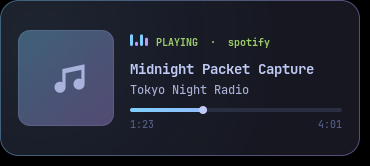
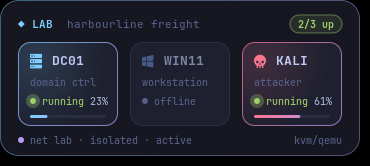
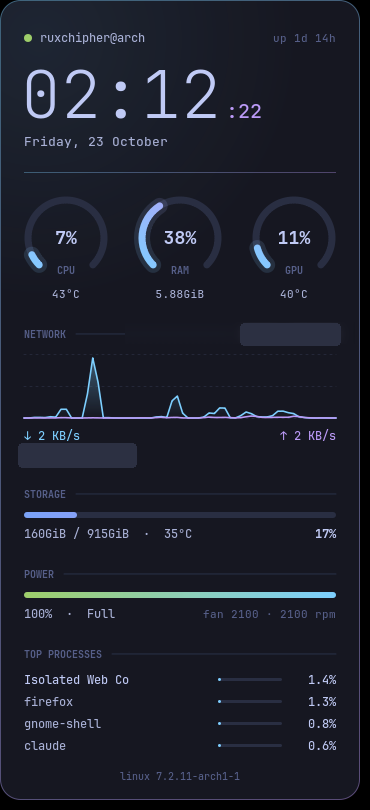
My Arch Linux laptop, customised into a security-aware workstation: custom-coded widgets that monitor the system and my lab, and a small service that alerts me to suspicious activity.

ruxchipher@arch · GNOME on Wayland · Tokyo Nighthover a widget for its source file
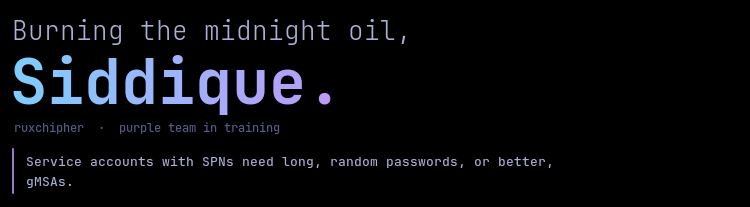
Greeting widget: Burning the midnight oil, Siddique, with a cyber security tip about service account passwords
left.lua
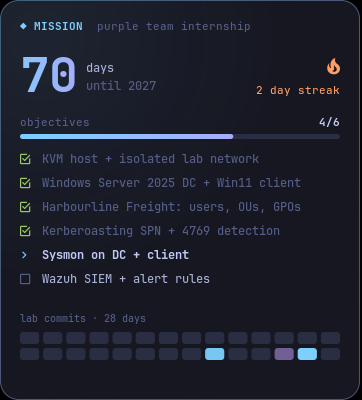
Mission tracker counting down the days to 2027 with lab objectives and a commit heatmap
left.lua · mission
Sydney weather and calendar widget
left.lua · weather
Now playing widget with album art, track title and progress bar
media.lua
Lab widget showing the DC01, WIN11 and KALI virtual machines with live status and CPU usage
lab.lua
System monitor HUD with clock, CPU, RAM and GPU gauges, network graph, storage, battery and top processes
hud.lua

// lab and now-playing widgets shown with preview data · network name and IP redacted

sentinel: host alerting blue team

A Python service I wrote that runs in the background and sends a desktop alert when something looks wrong.

  • Follows the systemd journal for failed passwords: sudo, admin prompts, the login screen and SSH.
  • Polls listening TCP ports and flags any new one, marked critical if it's reachable from the network.
  • De-duplicates repeats and writes every alert to a log for review.
[!] Failed password | source: sudo [!] New listening port (network-exposed) 0.0.0.0:48765 · process: python

ruxchipher HUD Lua · cairo

Four desktop widgets drawn from scratch in Lua with the cairo graphics library, running on Conky.

  • Battery-aware GPU polling: checks the GPU's power state first, so the monitor never wakes the RTX 4060.
  • Live lab status: reads virsh domstats to show which VMs are running and how busy they are.
  • Mission tracker: my 2027 goal, lab objectives and a commit streak pulled from my lab repo's git history.
  • Non-blocking data: weather and album art are fetched in the background, and the media widget hides itself when nothing is playing.
ruxchipher / ruxchipher-dotfiles All widget, sentinel and terminal configs

05 · skills

Both sides of the wire.

Tools and concepts I've used hands-on in my lab and coursework.

// offensive

Red

Thinking like the attacker so the defence has something real to catch.

  • Kali Linux
  • Kerberoasting
  • SPN enumeration
  • Networking

// defensive

Blue

Building, hardening and watching the environment.

  • Active Directory
  • GPO
  • Kerberoasting detection
  • Event ID 4769
  • Sysmon
  • Sigma
  • Wireshark

// dev & infra

Build

The code and platforms everything else runs on.

  • Python
  • Java
  • JDBC
  • Bash
  • Git
  • Arch Linux
  • KVM
red + blue = purple Every attack I run in the lab ends with a detection I can show for it.

06 · about

Build the lab first.
Learn the theory second.

I'm Abu Bakar Siddique, though most people call me Siddique. I'm a final-year Bachelor of IT student at CQUniversity in Sydney, majoring in Cyber Security with a minor in Application Development.

I learn by doing. Before I read the chapter on Kerberos, I'd rather have a domain controller running, an attacker box ready, and a log to dig through. Running the attack, watching it land in the logs, and then writing the detection is the loop that makes things click for me.

My goal is a purple team internship in 2027, where offensive and defensive security work together.

My learning loop

  1. 01
    Attack it

    Run the technique from Kali against my own domain.

  2. 02
    Log it

    Make sure the right telemetry exists to see it.

  3. 03
    Detect it

    Write a query that catches it, then tune out the noise.

  4. 04
    Harden it

    Fix the weakness so the attack stops working.

  5. 05
    Repeat

    Pick the next technique on the roadmap.

07 · journey

Study, work and where it's heading.

education

Bachelor of Information Technology

CQUniversity Australia

  • major · Cyber Security
  • minor · Application Development
  • status · 2nd year

work · alongside study

Rental Operations Agent

Avis Budget Group

Keeps me sharp on communication, working under time pressure, and solving problems for real people.

  1. HE Term 1 · 2025

    Started the Bachelor of IT

    Cyber Security major with an Application Development minor.

  2. Now

    Second year + Harbourline Freight lab

    Studying, working at Avis, and building out the AD lab, now with Sysmon and a Wazuh SIEM running detections.

  3. 2027

    Purple team internship

    The next milestone I'm working toward.

08 · contact

Open a connection.

Looking for a purple team intern for 2027, or want to talk about labs and detections? Reach out. I usually reply within a day.

❯ ./connect.sh --with siddique [+] handshake ok · open to: internships, lab collabs, mentoring # this terminal works. type help

try help whoami lab detect

Prefer a one-pager? Grab my résumé. download résumé